How to set up and monitor lemwarm
April 7, 2026
|7 min read
TL;DR: Use this guide to set up lemwarm, choose the right plan, adjust your warm-up settings, and track your deliverability results. This helps you build sender reputation safely so more emails land in the inbox instead of spam. Getting started takes about 5–10 minutes, while the full warm-up process usually takes 3–5 weeks.
If you're just starting with lemwarm and want to optimize your email deliverability, this guide walks you through the essentials so you can get to your first results quickly.
Who should use this
- New lemwarm users setting up their first email warm-up
- Outbound sales teams preparing a mailbox before launching campaigns
- Agencies or admins who need to manage a lemwarm plan and monitor deliverability
Why this matters
lemwarm helps you build and protect your sender reputation over time. A proper setup reduces the risk of emails landing in spam, gives you visibility into deliverability issues, and helps you scale outreach more safely.
Before you start
Before relying on your deliverability score or launching campaigns, make sure the technical setup is in place.
- Set up SPF, DKIM, and DMARC correctly
- Add a custom tracking domain
- Follow campaign best practices: use clean lists, write quality content, and aim for natural engagement

Important: Monitor your deliverability score regularly and adjust your sending volumes when needed to protect your reputation and improve engagement.
Step-by-step guide
1. Keep lemwarm running long enough
We recommend keeping lemwarm active at all times for the best results. Ideally, let it run for at least one month so your sender reputation has enough time to build.
Important: During the first few weeks, avoid sending large outreach campaigns. Start small and increase gradually.
- Week 1: 10–15 emails per day
- Week 2: 20–30 emails per day
- Following weeks: increase step by step as your mailbox warms up
2. Choose your lemwarm plan
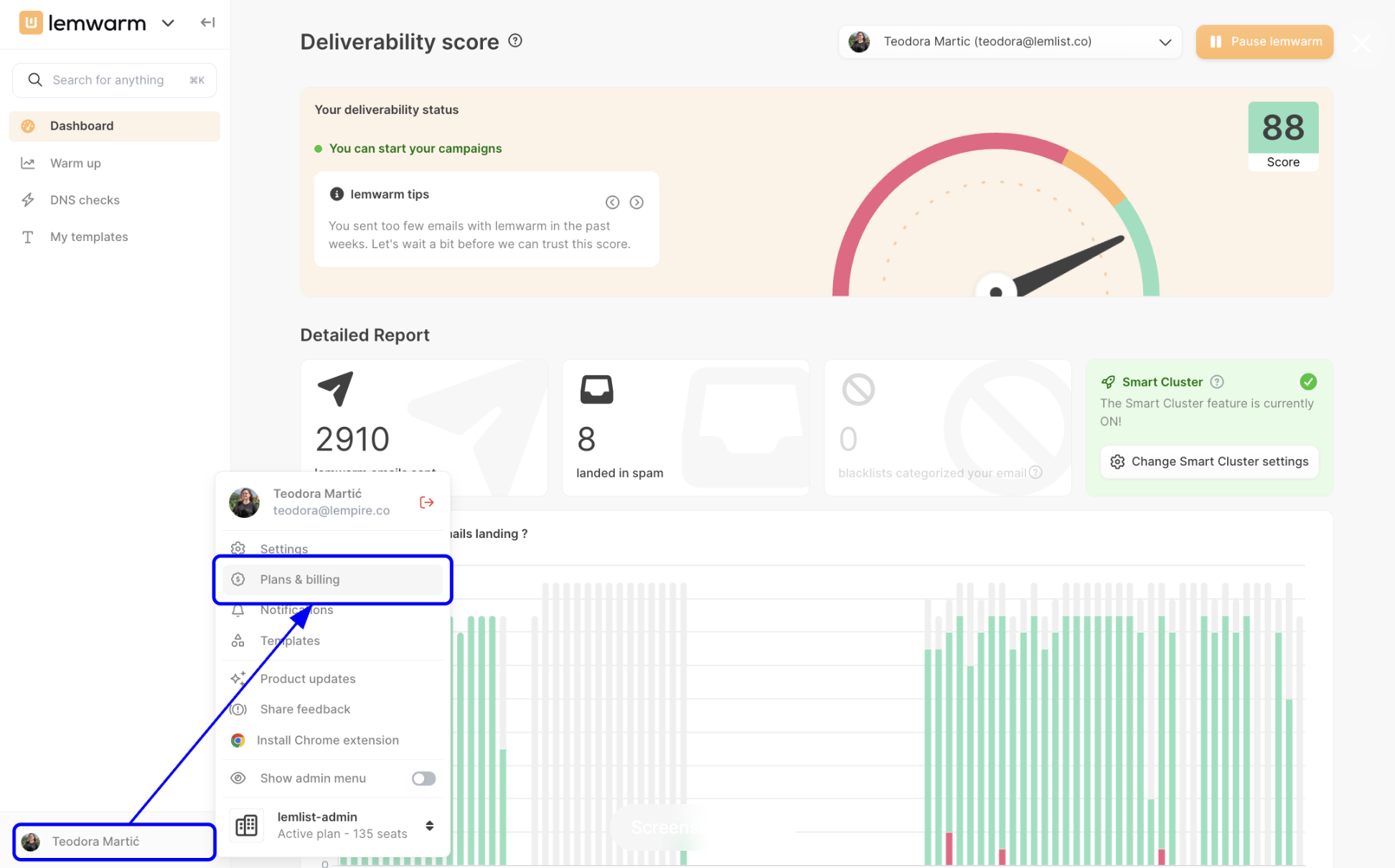
Before starting warm-up, add your billing details and select the lemwarm plan that matches your needs. From the dashboard, click your profile in the bottom-left corner, then open Plans & billing.
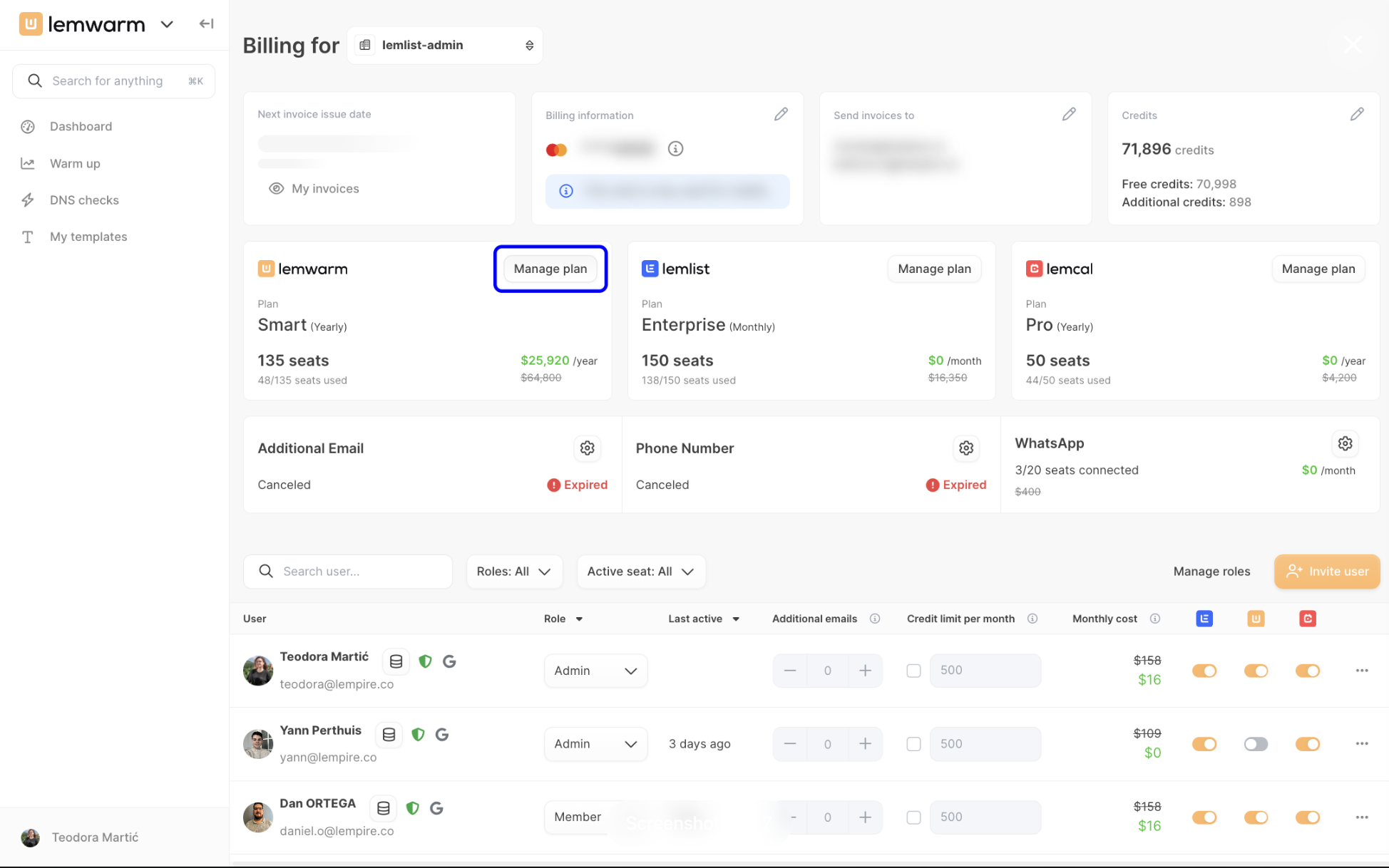
On the billing page, find the lemwarm card and click Manage plan.
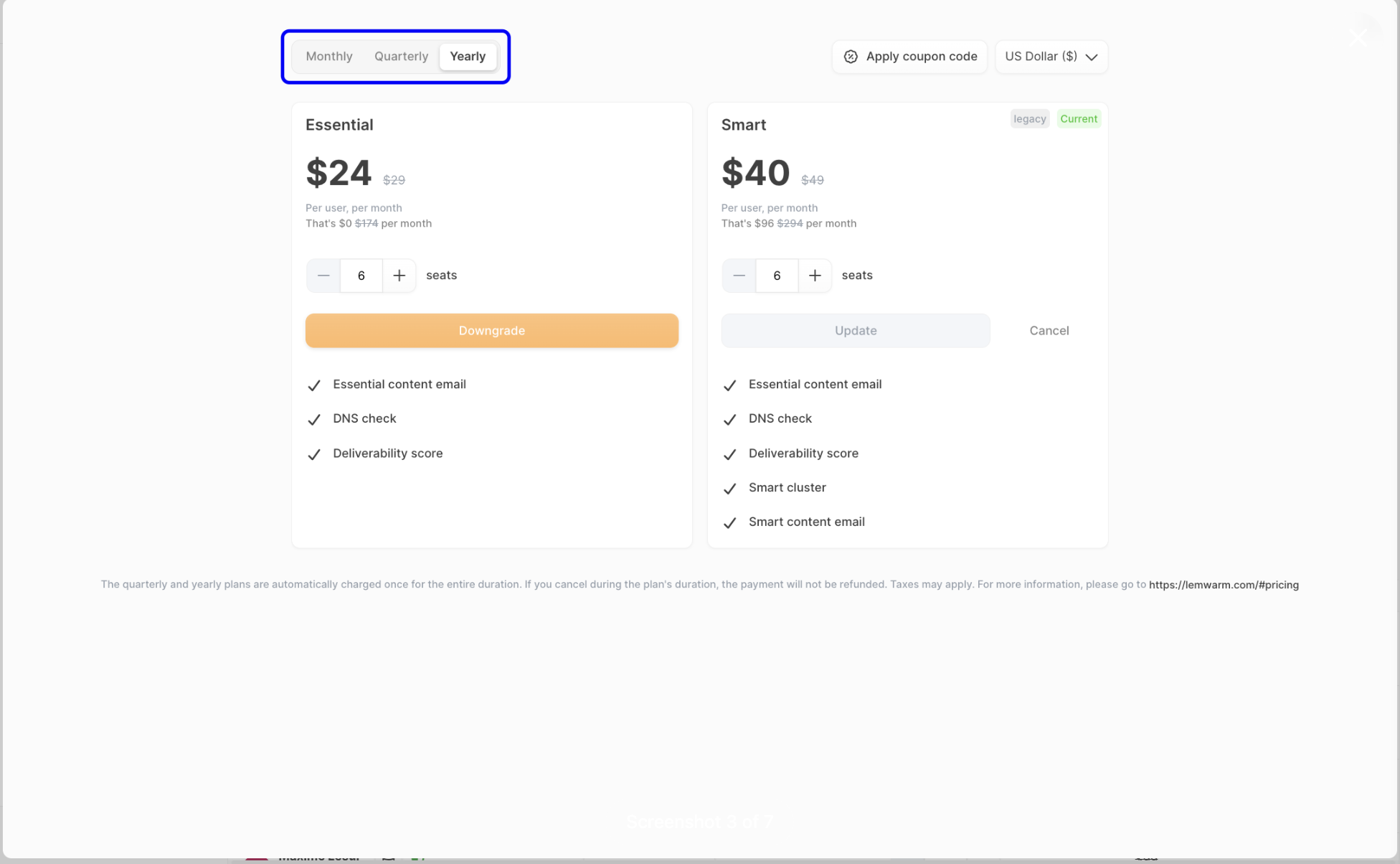
Then choose your billing frequency using Monthly, Quarterly, or Yearly.
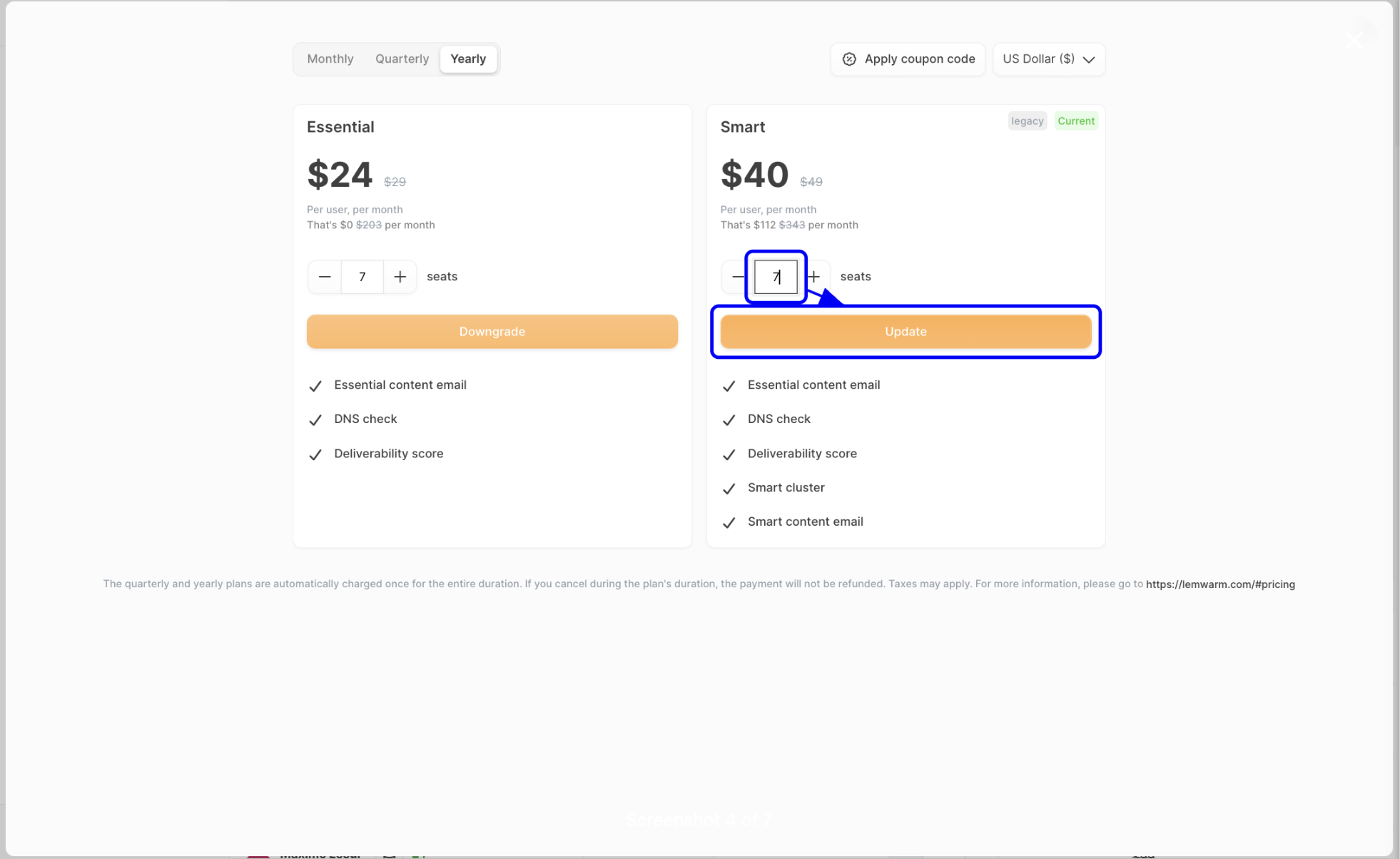
If needed, adjust the number of seats and click Update to confirm the plan change.
3. Connect the email address you want to warm up
After selecting a plan, connect the mailbox you want to warm up. Add the email address and the password used to log in to that mailbox.
4. Verify the email address and start lemwarm
Once the mailbox is connected, complete the verification step. After verification, click Start lemwarm so lemwarm can begin sending warm-up emails and replying when needed.
5. Customize your warm-up settings
By default, lemwarm automatically calculates the best sending volume based on your deliverability score. If you prefer, you can set your own limits in Warm up.
Recommended settings based on your deliverability score:
- Score below 65: Don't run campaigns yet. Only use lemwarm to rebuild your sender reputation and set the ramp-up to 10/1.
- Score 65–80: You can start campaigns once you hit 70, but it's better to finish warm-up first. Set the ramp-up to 20/2 and increase sending volume slowly.
- Score above 80: Start campaigns with 5–10 emails/day, then ramp up gradually. Set the ramp-up to 30/3. If your score drops, reduce volume.
Example: if the ramp-up increment is set to 3, lemwarm sends 3 emails on day 1, 6 on day 2, 9 on day 3, and continues until it reaches your daily maximum.
Tip: This gradual increase usually takes 3–5 weeks and is safer than jumping straight to high sending volumes.
6. Keep lemwarm emails out of your main inbox
To avoid clutter, create a mailbox filter so warm-up emails are separated from your regular conversations. This makes it easier to stay organized while lemwarm continues running in the background.
7. Monitor your deliverability score
Your deliverability score shows how likely your emails are to land in the inbox instead of spam. Use it as your main signal for deciding whether to keep warming up, start campaigns, or reduce volume.
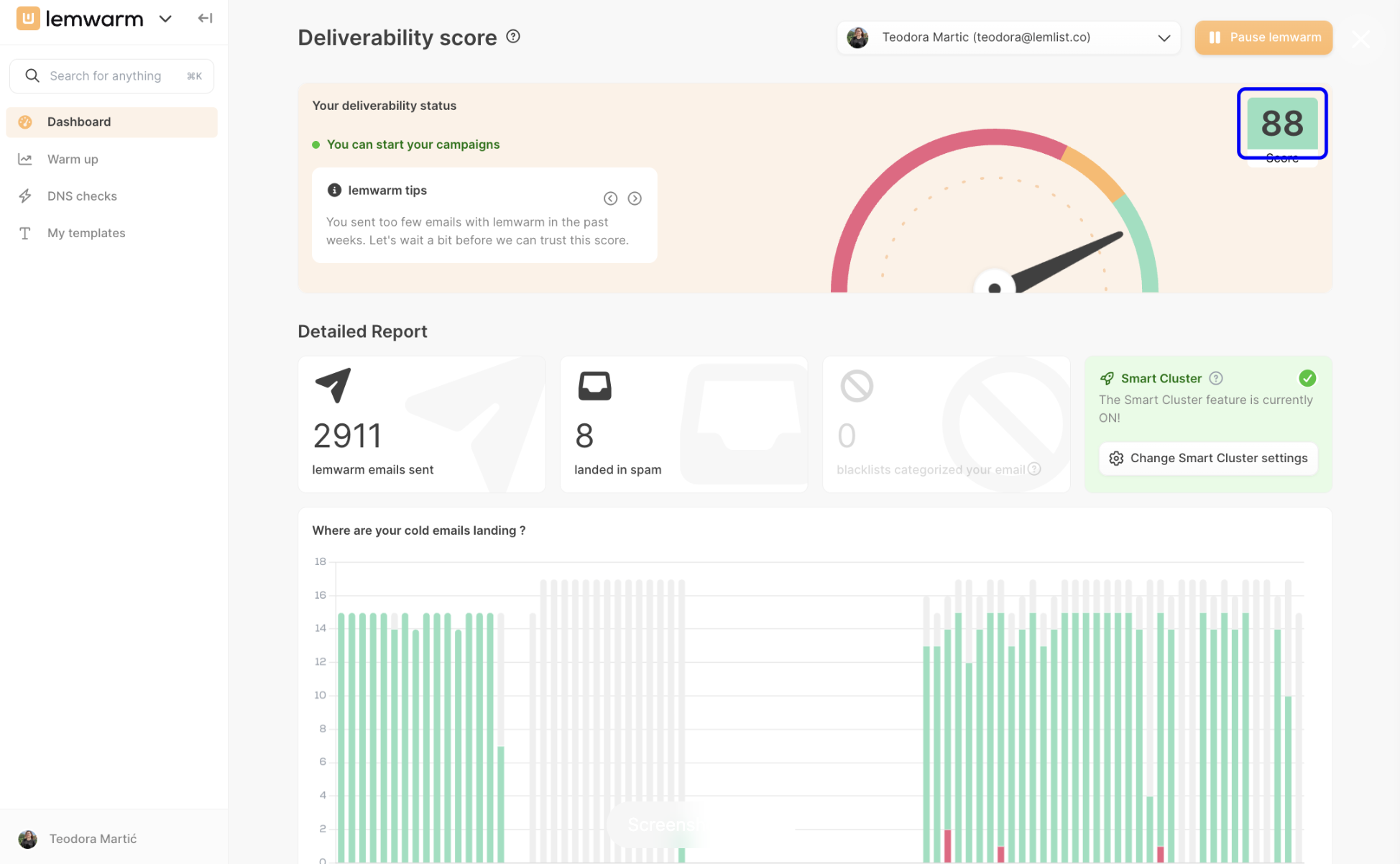
How to interpret your score:
- Below 65: your mailbox is not ready for campaigns yet. Keep lemwarm running and avoid outreach.
- 65–80: your mailbox is improving. You can start campaigns once you reach 70, but a longer warm-up is safer.
- Above 80: your mailbox is in a stronger position to start campaigns, as long as you ramp up gradually.
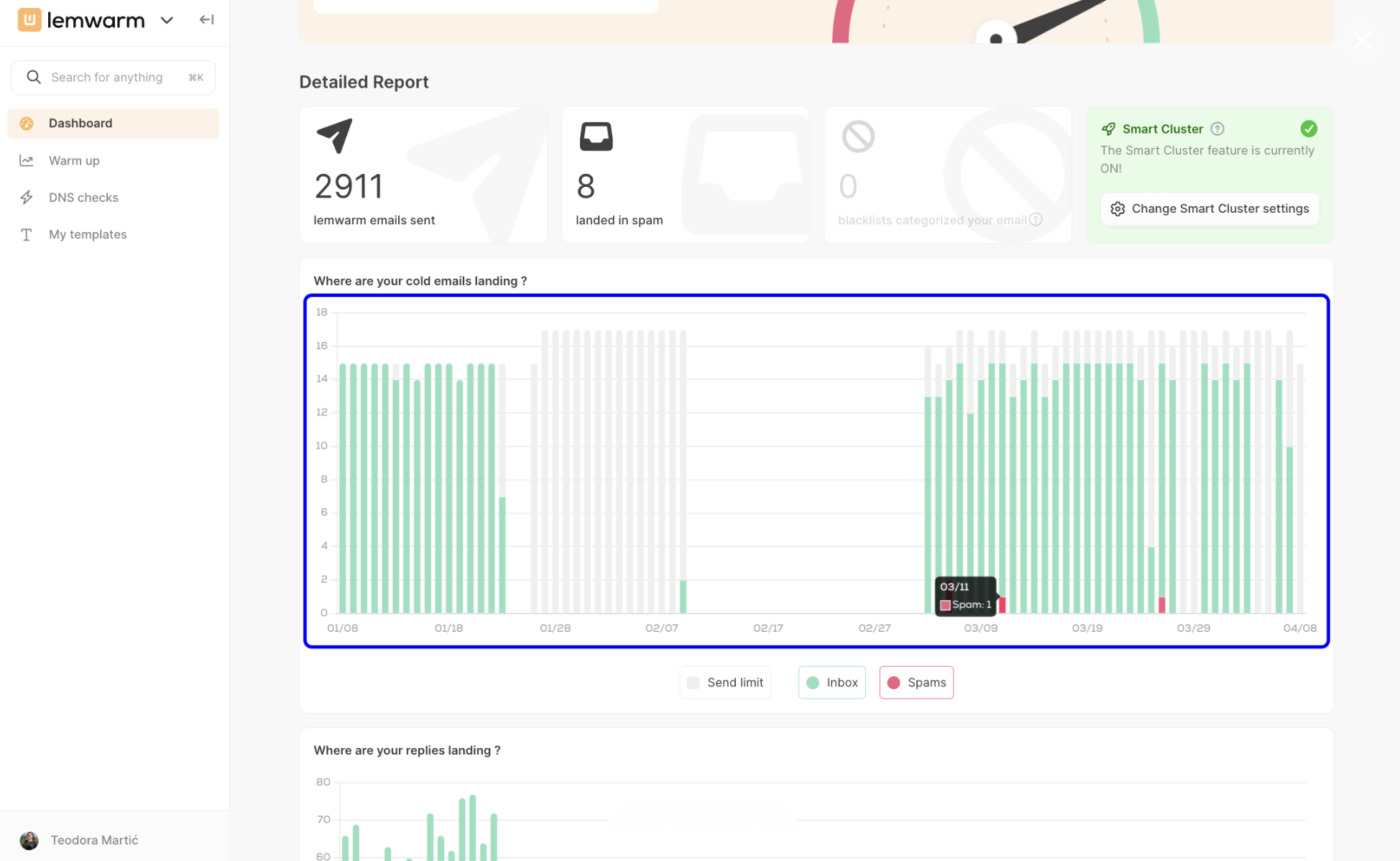
8. Review where your cold emails are landing
The first performance graph shows how your cold emails are performing over time. Green bars represent emails landing in the Inbox, while red bars represent emails landing in Spam.
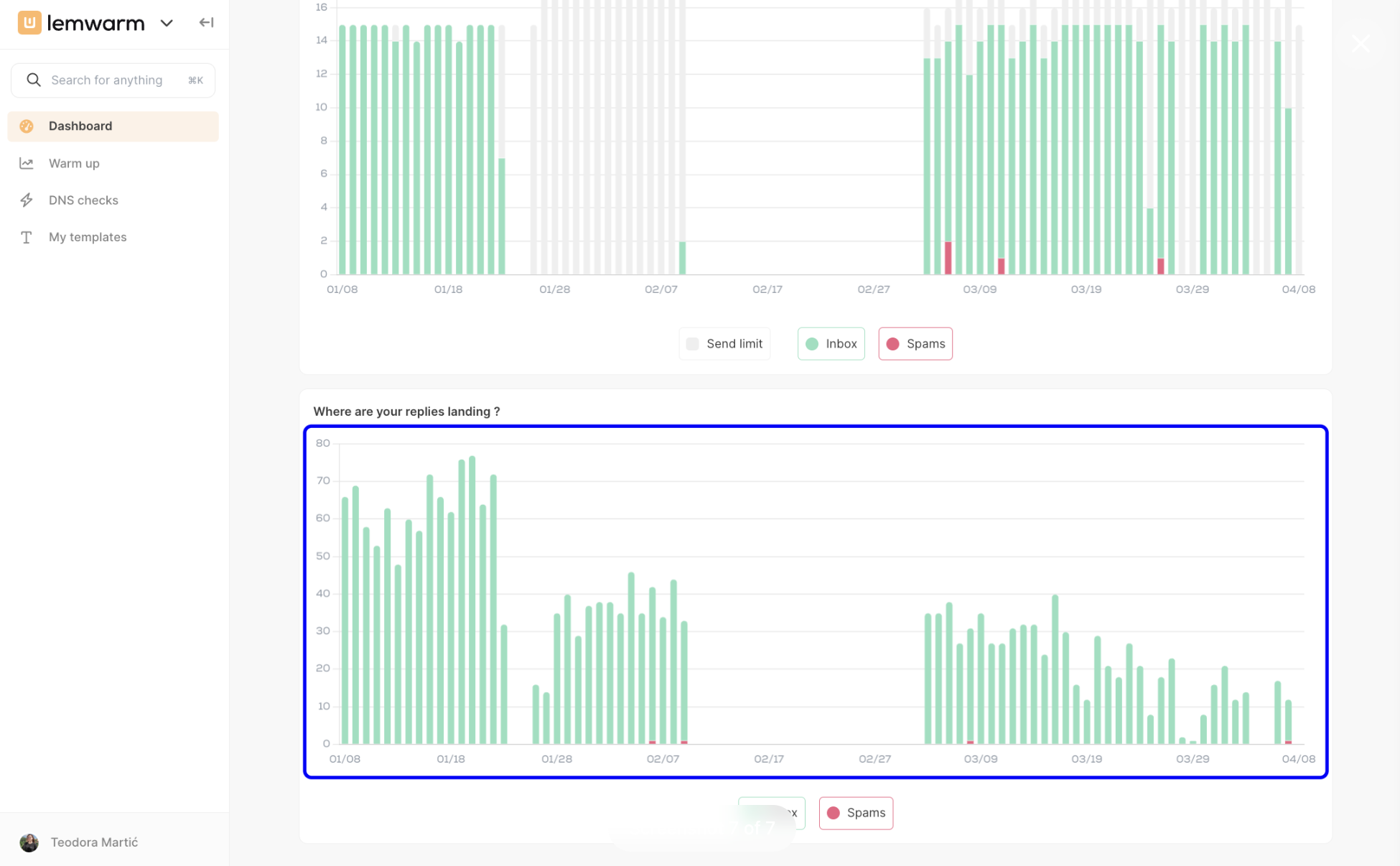
9. Review where replies are landing
The second graph helps you track reply performance. It shows whether replies are landing in the inbox or spam, which gives you another signal about mailbox health and overall deliverability.
How you’ll know it worked
- ✓ Your email account is connected and verified
- ✓ lemwarm is active and warm-up emails are being sent
- ✓ You can see a deliverability score on the dashboard
- ✓ The cold email and reply graphs begin showing inbox vs. spam results
- ✓ Your score improves enough to support a safe, gradual campaign launch
Billing and plan notes
lemwarm offers different billing frequencies, including monthly, quarterly, and yearly options. If you change plans or seat counts, charges update based on the selection you confirm in Plans & billing. Review your billing cycle carefully before updating, especially if you are managing multiple seats.
Troubleshooting
Issue: My deliverability score is low or not improving
Root cause: The mailbox is still early in the warm-up phase, or your technical setup and sending habits are hurting reputation.
Fix:
Root cause: The mailbox is still early in the warm-up phase, or your technical setup and sending habits are hurting reputation.
Fix:
- Keep lemwarm active for at least a few weeks
- If your score is below 65, stop campaigns and use a 10/1 ramp-up only
- Check that SPF, DKIM, and DMARC are configured correctly
- Add a custom tracking domain
- Use clean lists and improve email quality before increasing volume
Issue: My emails are landing in spam
Root cause: Sender reputation, email content, daily volume, or list quality may be hurting deliverability.
Fix:
Root cause: Sender reputation, email content, daily volume, or list quality may be hurting deliverability.
Fix:
- Review your subject lines and email copy
- Lower your daily sending volume temporarily
- Check that your lead list is clean and relevant
- Keep monitoring dashboard reports and your deliverability score for improvement
Issue: My inbox is filling up with lemwarm messages
Root cause: No mailbox filter has been set up for warm-up emails.
Fix:
Root cause: No mailbox filter has been set up for warm-up emails.
Fix:
- Create a dedicated inbox filter or rule
- Move warm-up emails to a folder or archive automatically
- See the article How to stop lemwarm emails flooding my inbox? for detailed steps
Issue: I cannot change my plan
Root cause: The change may not have been confirmed, or you may be editing the wrong workspace billing page.
Fix:
Root cause: The change may not have been confirmed, or you may be editing the wrong workspace billing page.
Fix:
- Go to Profile → Plans & billing
- Select the correct workspace
- Open Manage plan, adjust the billing option or seats, and click Update
By following these steps, you’ll have everything in place to start warming up your mailbox, improving sender reputation, and monitoring results directly from your lemwarm dashboard.