How to enable and disable seats in lemwarm
January 30, 2025
|3 min read
Why This Matters
In lemwarm, a user can be on your team without consuming a paid seat — but only users with an enabled seat can run the warmup process. This means you can invite collaborators or admins for oversight purposes without paying for extra seats, and reassign seat access as your team's needs change.
Who This Is For
Admins managing team access and seat allocation. If you're not an Admin, you cannot enable or disable seats — contact your team's Admin to request access.
Prerequisites
- You are assigned the Admin role on the team
- You have available paid seats on your plan (go to Plans & billing to check)
- The user you want to enable is already on your team (see How to invite team members and manage roles in lemwarm)
Understanding seats before you start
Not every user on your team needs an active seat. Here's the key distinction:
Seat status | Can warm up emails? | Can access lemwarm? |
|---|---|---|
Enabled | Yes | Yes — full access |
Disabled | No | Yes — limited access |
Admins without a seat can access all sections of lemwarm except starting the warmup process.
Members without a seat can access most sections but cannot start warmup or access Plans & billing.

How users get a seat when invited:
- Invited as a paying seat → seat is enabled automatically
- Invited as a guest → seat is not enabled; you can enable it manually later
Steps
1. Open Plans & billing
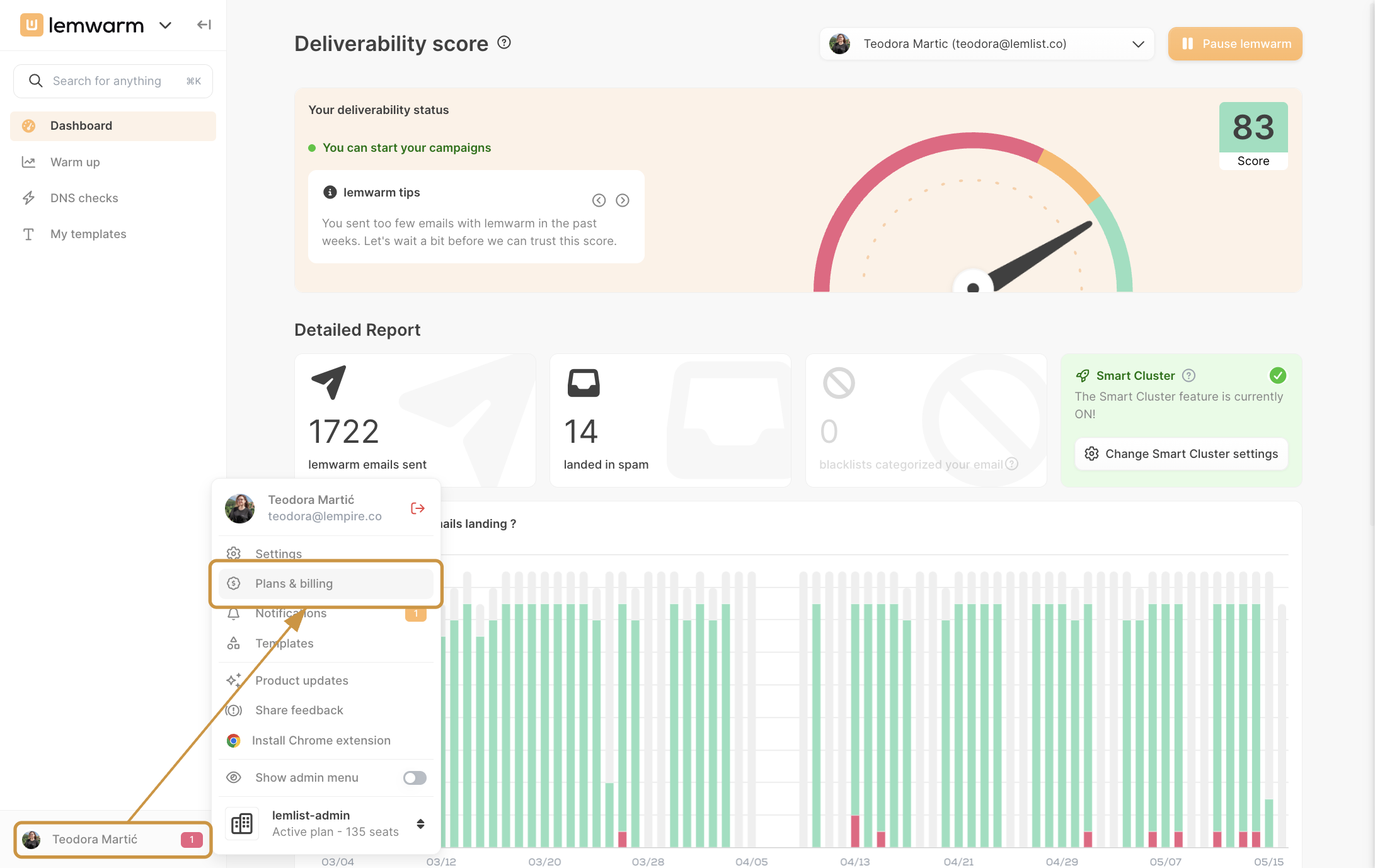
Click your profile icon in the bottom-left corner of lemwarm, then click Plans & billing.
2. Find the user in the team list
Scroll through the user list or use the Search user field to find the person whose seat you want to update.
3. Enable or disable the seat
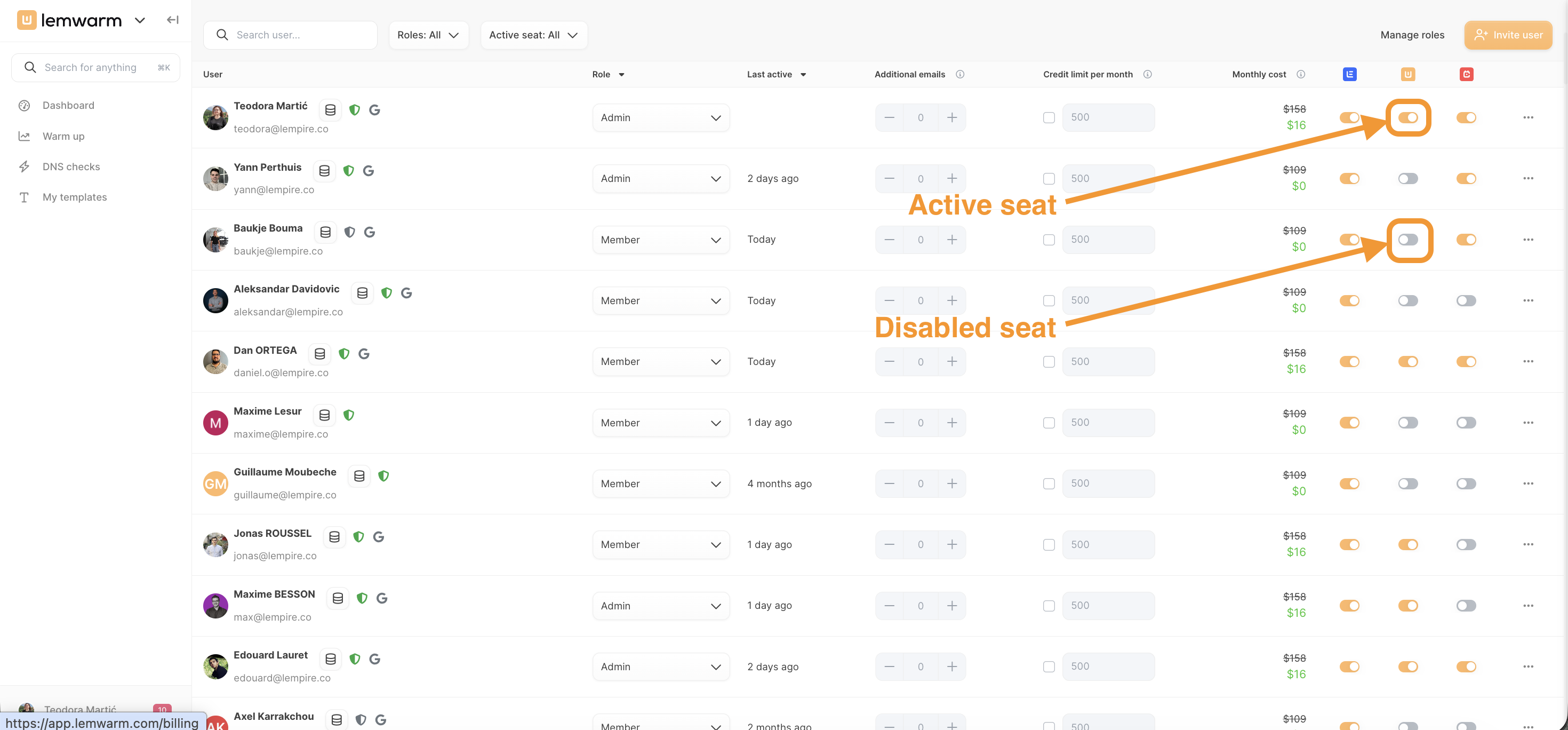
In the row for that user, locate the lemwarm toggle (the column marked with the lemwarm icon).
- Toggle on (orange) to enable the seat — the user can now run the warmup process.
- Toggle off (grey) to disable the seat — the user remains on the team but cannot start warmup.
The change takes effect immediately.
How you'll know it worked
- ✅ Enabled seat: the toggle is orange and the user can access the warmup process
- ✅ Disabled seat: the toggle is grey and the user's warmup access is removed
- ✅ The user's monthly cost updates to reflect the change
- ✅ Your available seat count adjusts accordingly under Plans & billing
Seats and email address connections
How many email addresses a user can connect for warmup depends on their subscription:
- With a lemlist subscription — a user can connect multiple email addresses based on their lemlist plan, and all connected addresses can use lemwarm.
- Without a lemlist subscription — one seat covers one email address. To warm up multiple addresses, each one requires a separate seat.
Troubleshooting
Toggle is greyed out and can't be changed
- Cause: You may have reached your plan's seat limit.
- Fix: Go to Plans & billing and check how many seats are used versus available. Upgrade your plan or disable another user's seat to free one up.
User has an enabled seat but still can't start warmup
- Cause: The email address may not be connected to their lemwarm account.
- Fix: Ask the user to go to Warm up and connect their email address. The seat must be enabled and an email address must be connected for warmup to start.
Member can't enable their own seat
- Cause: Only Admins can enable or disable seats.
- Fix: The member should contact a team Admin to request seat access.